
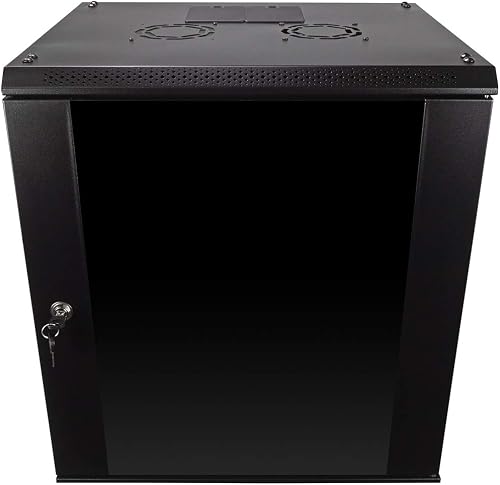
Running a home lab on a stack of switches and a NAS sitting on a shelf works — until a cable gets yanked, a drive falls off, or you add one more device and the whole setup becomes unmanageable. A proper server rack keeps your hardware organized, cools more efficiently, and makes cable management actually possible. The challenge for home lab builders is finding a rack that fits in a bedroom, home office, or basement without the noise and cost of data center equipment. We compared the best home lab server racks on Amazon across three categories: open frame, enclosed cabinet, and compact wall mount. New to this? Our 6U Open Frame Wall Mount Rack guide walks through the fundamentals first.
⚡ Quick Picks — Best Server Racks for Home Lab
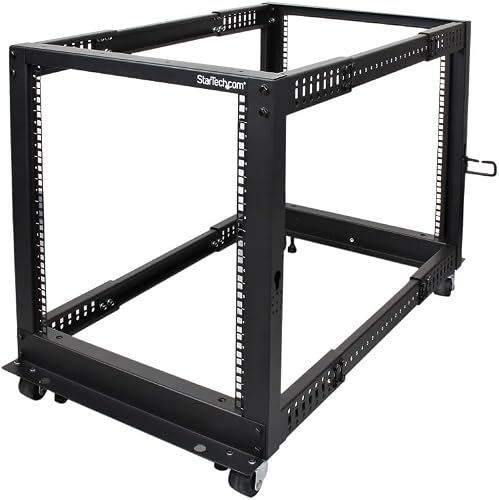
- 🏆 Best Overall: NavePoint 12U Open Frame Server Rack — solid 12U open frame, 450 lb capacity, casters and leveling feet
- 🔒 Best Enclosed: StarTech 12U Enclosed Server Cabinet — lockable, full cable management, soundproofing panels
- 📦 Best Compact: NavePoint 9U Wall Mount Network Cabinet — wall-mounted, small footprint, glass door, ideal for under 6 devices
What to Look for in a Home Lab Server Rack
Open frame racks (no side panels) are cheaper, run cooler, and let you access gear from all angles. Enclosed cabinets lock for security and include cable management, but run hotter without active cooling. For home labs in climate-controlled rooms without foot traffic, open frame is better. For families with kids, high-traffic areas, or any shared space, enclosed is worth the premium.
One ‘U’ is 1.75 inches of vertical space. A standard 1U server is 1.75 inches tall. Count your current equipment in U-space and add 25% for growth. Most home lab builders start with 8–12U: a 1U switch, 2U NAS, 1U patch panel, 1U KVM, and room for 2–3 more devices. A 12U rack covers most home labs comfortably.
Home lab equipment is heavier than it looks. A single dense NAS with drives can weigh 25–40 lbs, and full 1U servers average 30–50 lbs each. Add it up before buying — a 12U rack fully loaded can easily reach 150–300 lbs. Budget racks rated at 220 lbs that are built from thin sheet metal flex and creak. The NavePoint 12U handles 450 lbs.
Casters let you roll the rack away from the wall for rear cabling, which saves enormous time during setup and upgrades. Fixed feet with leveling adjustment keep the rack stable on uneven floors. The best racks include both — locking casters for mobility, leveling feet you drop down to lock in position.
Server fans are loud — enterprise hardware often runs at 70+ dB. If your home lab is in a living space, pick quieter prosumer hardware (Synology, QNAP, UniFi) over refurbished enterprise 1U servers. Enclosed cabinets trap heat but can include sound dampening foam — a meaningful noise reduction if neighbors or family are nearby.
Best Server Racks for Home Lab 2026 — Full Reviews
NavePoint’s 12U open frame has earned its reputation in the home lab community for being genuinely solid without enterprise pricing. The 450 lb weight rating isn’t marketing — the steel is thick enough that the frame doesn’t flex when fully loaded. It ships mostly assembled, the cage nuts are included, and the dual locking/caster system works exactly as advertised.
The StarTech enclosed cabinet is what home lab builders choose when they’re putting the rack somewhere visible or shared. The lockable glass front door looks presentable in an office or living room, and the sound-dampening foam on the side panels makes a real difference — measurably quieter than bare open frame in the same room. The built-in cable management channels keep the inside organized without extra accessories.
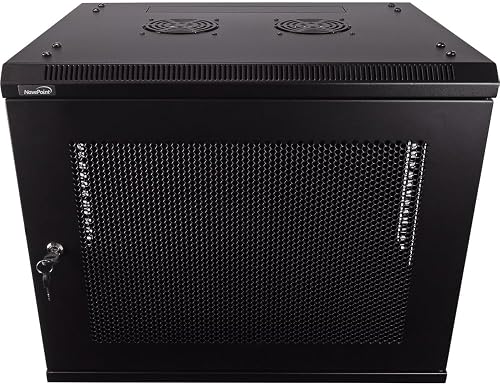
The NavePoint wall mount is for builders who genuinely can’t give up floor space. Mounted on wall studs, it handles 100 lbs — enough for a router, switch, patch panel, and NAS. The hinged design swings the entire cabinet away from the wall for rear access, which solves the primary frustration of wall-mount racks (no rear access once installed). At 9U, it’s the right size for a clean, minimal home network closet.
Home Lab Server Rack Comparison
| Product | Rating | Capacity | Type | Best For |
|---|---|---|---|---|
| NavePoint 12U Open Frame | 4.5/5 ⭐ | 450 lbs / 12U | Open frame floor | Full home lab builds |
| StarTech 12U Enclosed | 4.4/5 ⭐ | 12U | Enclosed cabinet | Security, noise reduction |
| NavePoint 9U Wall Mount | 4.5/5 ⭐ | 100 lbs / 9U | Wall mount enclosed | Small labs, no floor space |
❓ Frequently Asked Questions
What size server rack do I need for a home lab?
Most home lab builders are well-served by a 12U rack. Count your current equipment: a 1U switch, 2U NAS, 1U patch panel, and 1U UPS accounts for 5U. That leaves 7U of room for growth — usually enough for 2–3 years of expansion. 9U racks work for very small setups (router + switch + NAS only). 24U and above is data center territory, not typical home lab.
What is a rack unit (U) in server racks?
One rack unit (1U) equals 1.75 inches of vertical space. Standard servers are designed in multiples of U: a 1U server is 1.75 inches tall, a 2U server is 3.5 inches, and so on. Measure your equipment’s front-panel height and divide by 1.75 to get its U-size. Always leave 1–2U of open space between hot equipment for airflow.
How do I cool a server rack in a home lab?
For open frame racks, natural convection is usually sufficient if equipment spacing allows it. For enclosed cabinets, add a 1U blanking panel above and below each server to force airflow front-to-back, and add a rack-mount exhaust fan in the top of the cabinet. Keep the room temperature below 75°F — server performance drops and fan noise increases significantly above that threshold.
Can I put a server rack in a bedroom?
Yes, but manage the noise. Enterprise servers (like Dell PowerEdge or HP ProLiant refurb units) run their fans at 60–75 dB during operation — comparable to a vacuum cleaner. For bedroom labs, use prosumer equipment: Synology NAS, UniFi switches, and Raspberry Pi clusters are dramatically quieter. An enclosed cabinet with sound-dampening panels further reduces noise by 5–10 dB.
Are open frame or enclosed server racks better for home labs?
For most home labs in dedicated spaces, open frame is better: lower cost, better cooling, easier cable management. Enclosed cabinets make sense if you need to lock equipment away from family members or pets, want noise reduction, or have the rack in a living space where aesthetics matter. The locked glass door on the NavePoint wall cabinet is a good middle ground.
🏆 Final Verdict
The NavePoint 12U open frame is the right rack for most home labs — the 450 lb capacity, caster mobility, and universal square-hole posts make it the most practical long-term investment. If you’re building in a shared space or family home where security and aesthetics matter, the StarTech enclosed cabinet is worth the premium. For small setups of 5–7 devices where floor space is precious, the NavePoint 9U wall mount is the cleanest solution. Check our guide to best storage racks for more organization ideas around the home.

🛠️ Buying Gear for Your Work Truck?
A free Amazon Business account gets you bulk pricing, tax-exempt purchases, and business-only deals on tools, racks, and truck accessories.
Create Free Amazon Business AccountAs an Amazon Associate we earn from qualifying purchases.